Unreal Engine plugin · Documentation
Fulmen.
Lightning explosions.
One actor, twenty electric explosions. Drop it, pick a preset: a bolt falls from the sky, the ground cracks, sparks fly, the air bends around the blast and real lights hit your set. Every layer can be tuned or switched off.
- Quick start
- 20 presets
- 13 layers
- Distortion
- Scorch styles
- Sequencer
- Blueprints
- All settings
- Compatibility
- Support
Quick start
BP_Fulmen from Plugins > Fulmen Content > Blueprints onto the ground.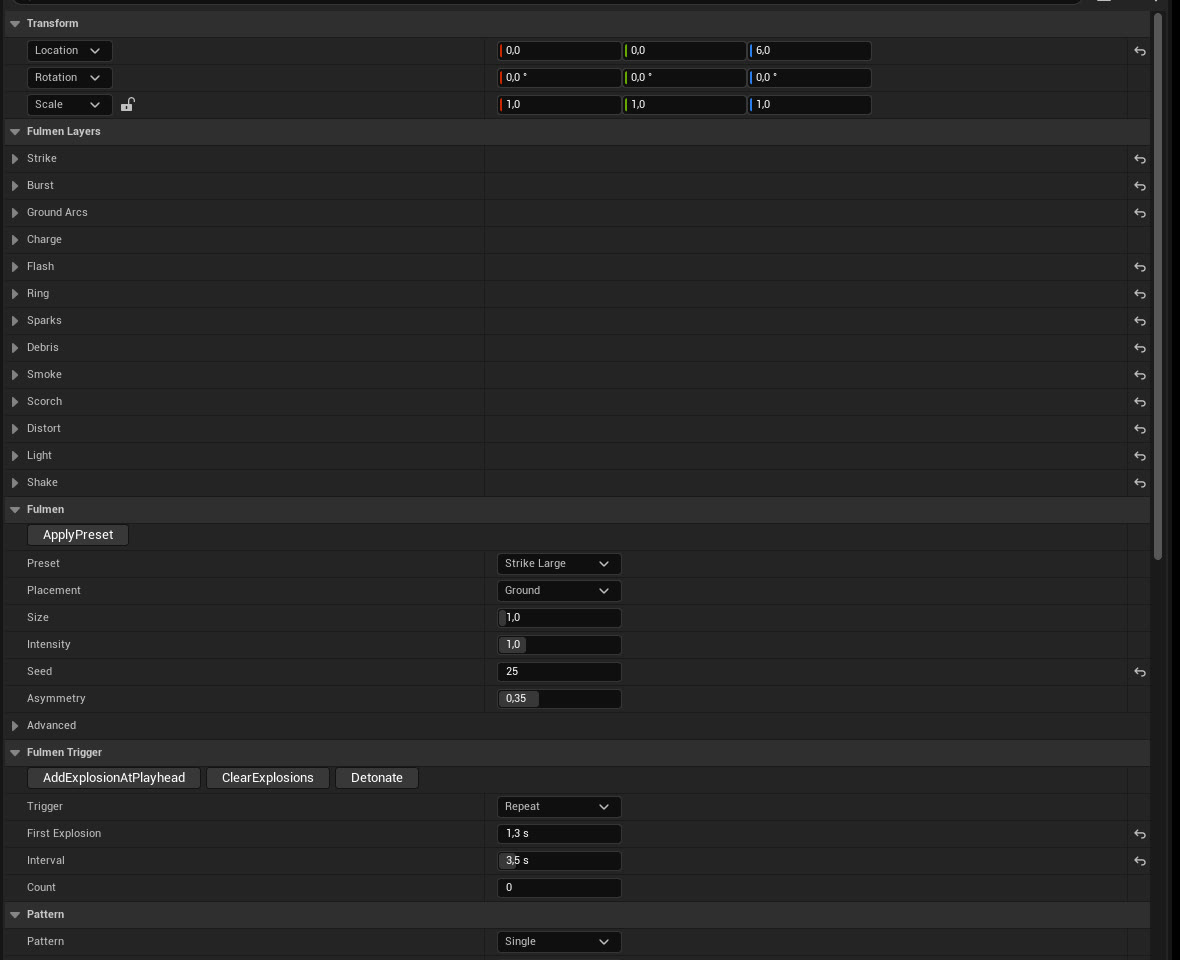
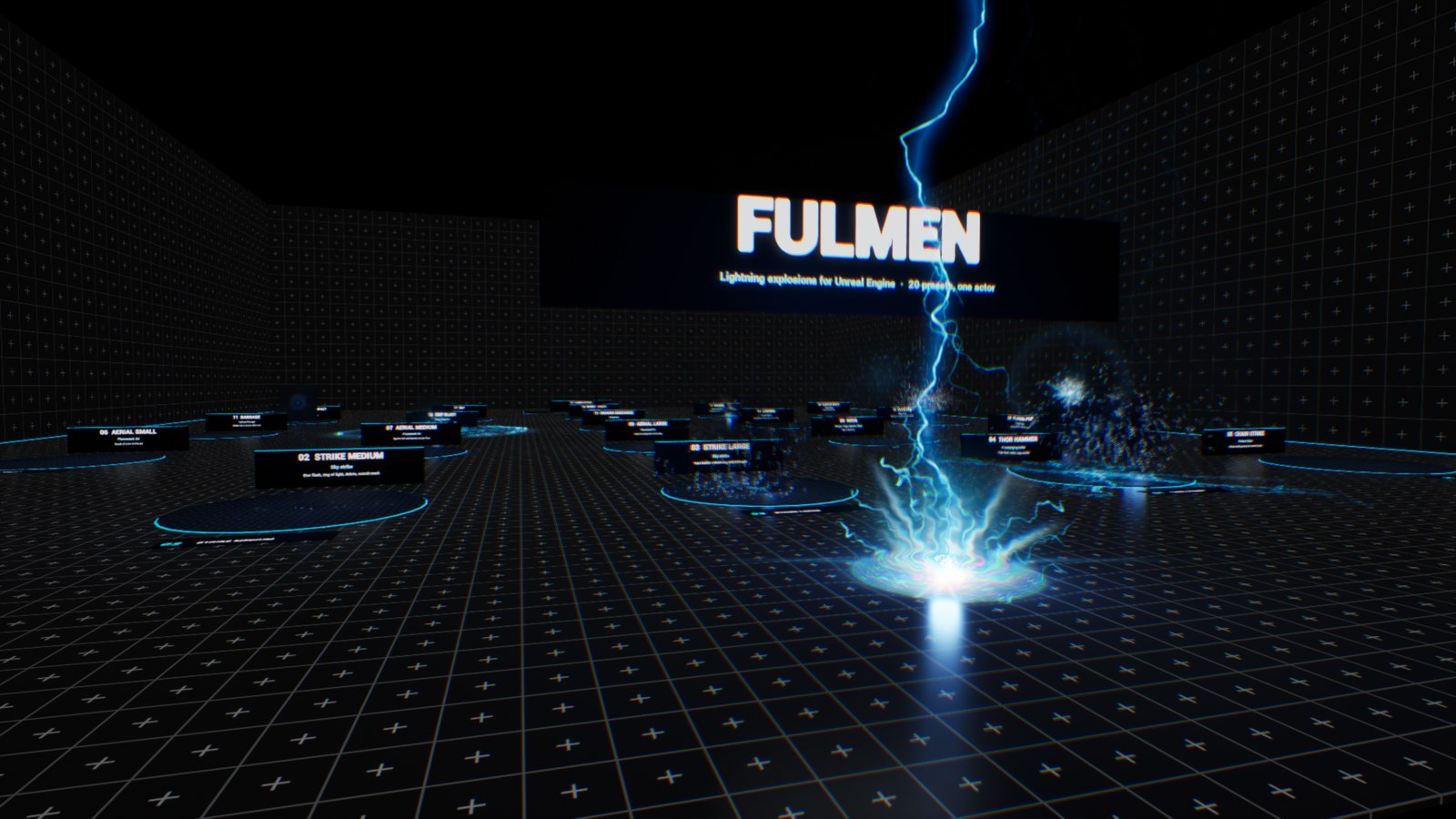
/Fulmen/Maps/Fulmen_Showcase: 21 booths, every preset and the 5 scorch styles. Walk in and press Play.20 presets
The numbers are the booths of the sample level. Each loop plays the preset as it ships, with nothing changed.
13 layers
An explosion is made of layers. Each one has an Enabled box and its own settings, so you can build your own explosion from any preset. Here is Strike Large with one layer switched on at a time:
Two more layers do not show in a still: Charge (arcs converge on a growing core before the blast, used by Plasma Pop, Overload and Nova) and Shake (camera shake for the players nearby, in game).
Distortion
The blast bends the image behind it, like hot air. A heat bubble works as a lens with a heat-haze shimmer, a shock ring runs over the ground and up the walls, and red and blue split apart. Drag the handle:
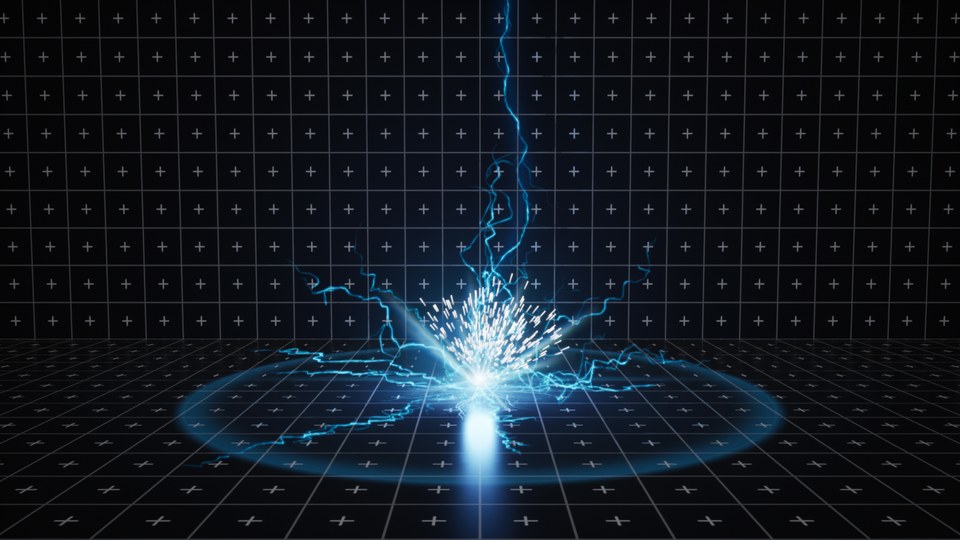
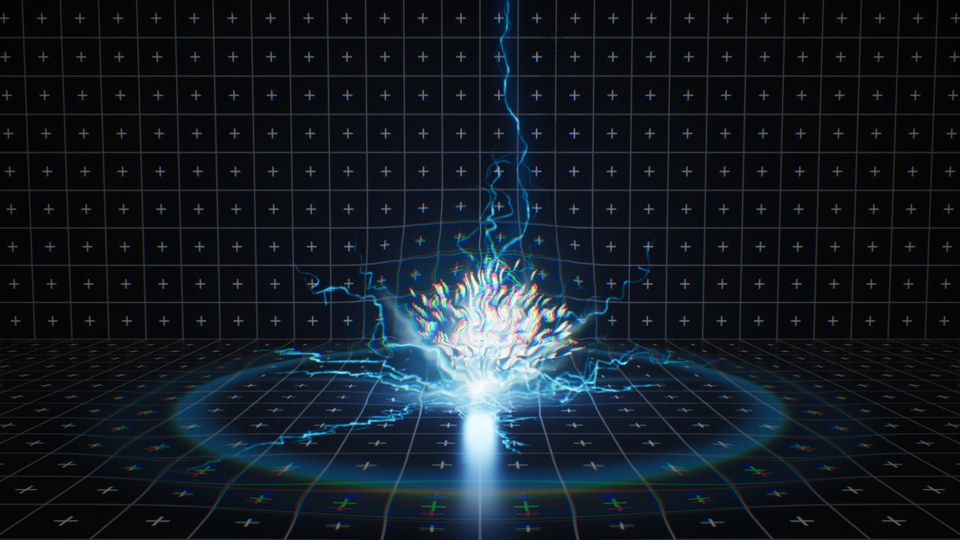 Distortion offDistortion on
- No sprite: there is never a square edge around the effect.
- What is in front of the blast stays sharp. Only what is behind it bends.
- Settings:
Bubble Radius,Bubble Strength,Shimmer,Ring Radius,Ring Strength,Ring Width,Ring On Surfaces(3D shell or a ring facing the camera),RGB Split,Punch(a short chromatic kick at the flash).
Scorch styles
The burn mark left on the ground is a decal with relief that catches the light. Its cracks glow, then cool down from the edge towards the centre. Pick a look in Scorch > Style:
Sequencer and Movie Render Queue
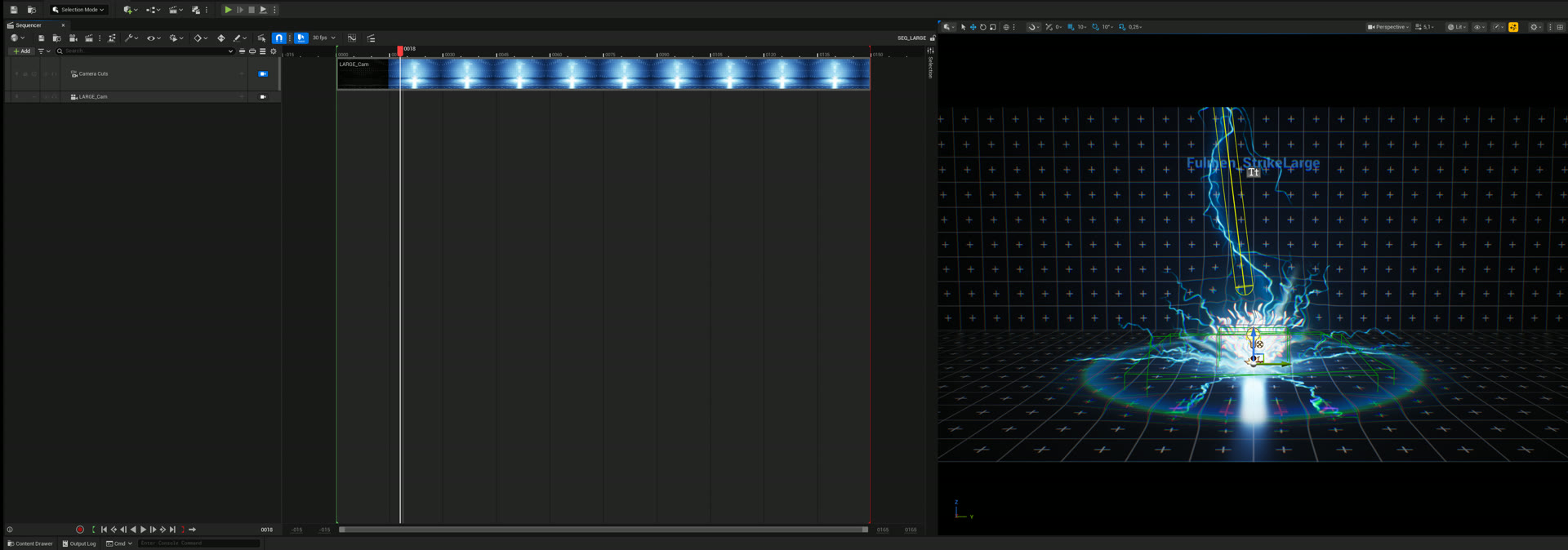
Follow Sequencer ticked (the default), Fulmen reads the time of the open sequence.For full manual control, tick Use Custom Time and key Custom Time. Time Scale below 1 gives slow motion.
Blueprints
Spawn an explosion anywhere during gameplay, and react when it hits:
- Spawn Fulmen Explosion: the explosion blows at once (after its leader or charge) and the actor removes itself when it is over. Rotation sets the surface: its up axis is the normal, so a wall hit is a rotated actor.
- On Hit: use it for damage, sounds or gameplay. Patterns (Chain, Barrage...) fire it for each hit.
- Detonate, Get Fulmen Time, Is Explosion Active, Get Explosion Duration.
- Make your own child Blueprints of
BP_Fulmenwith your settings, like a reusable "my lightning grenade".
All settings
Fulmen (main)
| Preset | One of the 20 presets. Changing it sets every layer. |
| Placement | Ground: arcs crawl on the ground, sparks bounce on it, a scorch mark stays. Air: the blast goes all around, sparks and debris fall to the floor below. |
| Size | Scales the whole explosion (sizes, distances, speeds). 1 suits a human-size scene. |
| Intensity | Global brightness of filaments, flash, lights and distortion. |
| Seed | Another explosion with the same settings. |
| Asymmetry | Tilts each blast to a random side, so no two look the same. |
Trigger and Pattern
| Repeat | An explosion every Interval seconds from First Explosion (Count 0 = forever). |
| Times | At the exact times of the Times list. |
| On Fire | Only when Detonate is called. |
| Pattern | Single, Chain (along X), Barrage (random in a disc), Ring, Cluster (in a volume). Hits, Spacing, Delay, Size Jitter, Height. |
Layers
| Strike | Height, Lean, Bolts (several converging), Leader Time, Decay, Restrikes, Restrike Window, Brightness, Width, Shape. |
| Burst | Count, Length, Spread (90 = hemisphere, 180 = all around), Grow Time, Duration, Retarget Rate, Bend, Hit Surfaces, Shape. |
| Ground Arcs | Count, Length, Crawl Time, Duration, Follow Ground, Lift, Linger (crackles that keep popping), Linger Arcs, Linger Length, Shape. |
| Charge | Time, Arcs, Radius, Brightness, Core Size, Implode. |
| Flash | Star (Size, Duration, Brightness, Rays, Chroma), Beams, lens streak, glow ball, Pre Flash. |
| Ring | Radius, Duration, Width, Brightness, Ease, Arcs along the front. |
| Sparks | Count, Speed, Spread, Gravity, Drag, Bounce, Lifetime, Streak Time, Min and Max Streak, Fade In, colours, Embers. |
| Debris | Count, Speed, Spread, Size, Gravity, Bounce, Lifetime, Heat, colours. |
| Smoke | Puffs, Spread, Size, Rise, Lifetime, Opacity, Color, Flash Lit. |
| Scorch | Style, Relief, Radius, Lifetime, Glow Time, Opacity, Glow Brightness, Glow Color. |
| Distortion | See Distortion. |
| Light | Intensity (candelas), Color, Radius, Lift, Shadows, Afterglow, Bolt Light. |
| Shake | Strength, Radius, Duration, Frequency, In Sequences. |
Look, Motion, Sound, Time
| Look | Core, Glow and Haze colours, Core Width, Glow Width, Haze Width, brightness of each, Min Pixel Width, Hot Spots, Dim Tint. Filaments are never thinner than a pixel: thinner ones get dimmer, so they never shimmer. |
| Motion | Shape Rate, Swim Rate, Smoothness, Flicker, Flicker Rate, Branch Rate, Branch Flicker. |
| Sound | A sound played at every hit in game, and its volume. No sound ships with the plugin. |
| Time | Follow Sequencer, Use Custom Time, Custom Time, Time Scale, Time Offset. |
Filaments, flash and smoke keep the same brightness at any exposure, so a preset looks the same in every level. The lights are physical: tune Light > Intensity to your exposure.
Compatibility and performance
- Unreal Engine 5.4, 5.5, 5.6, 5.7 and 5.8, Windows. Runtime module: works in packaged games.
- Everything is drawn by one custom primitive per explosion, rebuilt each frame only while the explosion is visible. The distortion is one post-process pass per explosion, only during its first half second.
- A large preset draws a few thousand filament points and a few hundred sparks.
- The filaments are translucent additive: they do not appear in Lumen reflections, but their lights do.
- Not network replicated: explosions are cosmetic. Call Detonate or Spawn Fulmen Explosion from your own replicated gameplay.
Support
Questions and bug reports: contentcreatorassetspack@gmail.com. Tell us your engine version and, if you can, attach a screenshot of the actor's settings.
Fulmen by Content Creator Assets · © 2026 Tony Lopez. All rights reserved.